

When we talk about routing, we often picture routers, firewalls, and network appliances moving traffic across large networks. But Linux itself is a router. Every Linux system makes routing decisions, even if it only has a single network interface.
Every time an application sends a packet, the Linux kernel decides where that packet should go. Sometimes the traffic stays local. Sometimes it leaves through a specific interface. In other cases, it must be forwarded to another network entirely. All of those decisions are made using the same routing logic, regardless of whether the system is acting as a simple workstation or as a multi-homed router.
This article looks at routing from the perspective of a single Linux host. We focus on how the kernel determines reachability and selects paths for outgoing traffic, working step by step through routes, scopes, routing tables, policy-based routing, and routing marks.
Rather than jumping straight into commands, the emphasis is on how routing decisions are made inside the kernel and how those decisions affect where packets actually go. Understanding this flow makes it easier to reason about routing behaviour, especially once systems become multi-homed or start handling traffic for other networks.
Routing vs Forwarding
Routing and forwarding are closely related, but they are not the same thing.
Routing is the decision-making process. It is about determining the best path a packet should take based on the information available to the kernel.
Forwarding is the action. It is the act of moving a packet from one network interface to another, or delivering it locally when the destination belongs to the system itself.
By default, IPv4 forwarding is disabled on a typical Linux host, so Linux will not route transit IPv4 packets from one network interface to another. This is intentional. A server should not accidentally behave like a router. When packet forwarding is enabled, Linux becomes capable of moving traffic between networks, but it still relies on routing information to decide how that traffic should flow.
To check whether IPv4 packet forwarding is enabled, you can use:
$ sysctl net.ipv4.ip_forward
If the output is 0, packet forwarding is disabled. If the output is 1, packet forwarding is enabled.
To enable packet forwarding temporarily, you can write directly to the kernel parameter:
$ echo 1 > /proc/sys/net/ipv4/ip_forwardOr use sysctl:
$ sysctl -w net.ipv4.ip_forward=1Both methods take effect immediately, but the change does not persist across reboots.
To make packet forwarding permanent, add the following line to a drop-in file under /etc/sysctl.d/. You can choose any filename, but it is common to prefix it with a number, for example 99-ip-forward.conf:
net.ipv4.ip_forward = 1Then apply the configuration:
$ sudo sysctl -pOnce a packet arrives on an interface, the kernel must answer a simple question:
Is this packet meant for me, or should it be sent somewhere else?
Routing determines the answer. Forwarding is what happens next.
IP Destination Classes
From the kernel’s point of view, every destination IP falls into one of three categories. This classification happens early and shapes every routing decision that follows.
Local destinations are IP addresses assigned to the system itself. This includes interface addresses and the loopback range.
You can see local destinations by inspecting interface addresses:
$ ip -c -4 -brief addr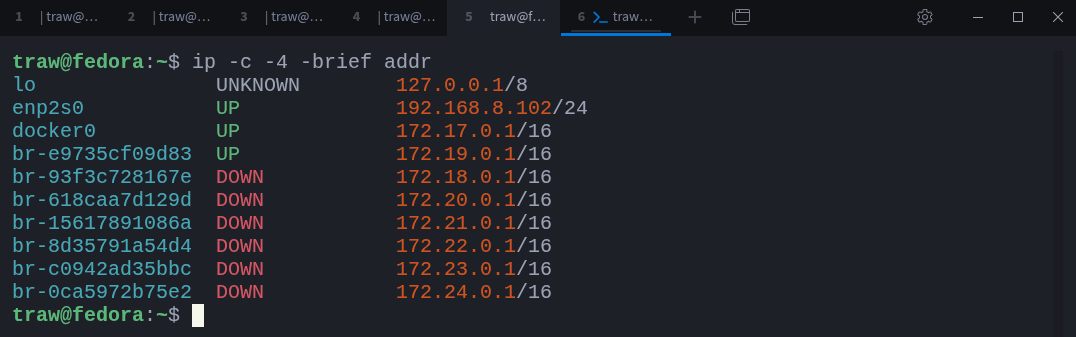
Each address shown here represents traffic that terminates on the local machine. The loopback interface deserves special attention: the entire 127.0.0.0/8 range points back to the system itself and is commonly used for local testing and inter-process communication.
If you are coming from Cisco or Juniper, these are typically referred to as local routes, and they usually appear as /32 host routes in routing tables.
Connected networks are networks that are directly reachable through a local interface. If an interface is configured with an address in a given subnet, Linux knows that any IP within that subnet can be reached without a router.
You can view connected networks with:
$ ip route show scope link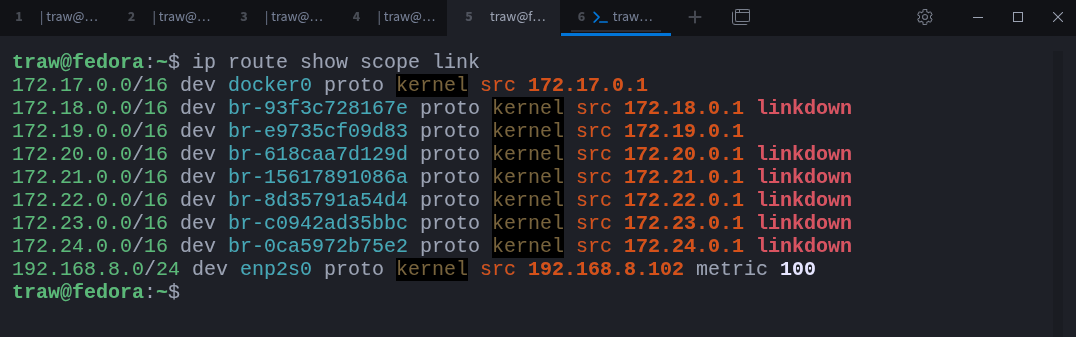
These routes tell the kernel which networks are reachable directly and through which interface. Traffic destined for any of these networks is sent straight out of the corresponding interface, without involving a gateway.
For example, traffic to 192.168.8.1 is sent directly out of enp2s0.
If you come from Cisco or Juniper environments, these are known as connected routes. Notice the use of scope link here; we will revisit scopes in more detail shortly.
Remote networks include everything else. If a destination is neither local nor directly connected, Linux must send the packet to a router that is directly reachable.
These routers are typically represented by default routes:
$ ip route show default
In this case, the system has two default routes, one per interface. Linux will not use both arbitrarily. Instead, it compares their metrics and selects the preferred path. We will look at route selection and metrics in detail later.
This classification is fundamental. Before the kernel evaluates metrics or chooses a gateway, it first determines whether a destination is local, connected, or remote.
Sysxplore is an indie, reader-supported publication.
I break down complex technical concepts in a straightforward way, making them easy to grasp. A lot of research goes into every piece to ensure the information you read is as accurate and practical as possible.
To support my work, consider becoming a free or paid subscriber and join the growing community of tech professionals.
What are Routes
A route is simply an instruction that tells the kernel how to reach a destination.
At a minimum, a route answers three questions:
Which destination does this apply to?
Where should the packet go next?
Which interface should be used?
In Linux, a route is made up of a few core components:
Destination
This can be a single IP address (a host route), a subnet (a network route), or a catch-all default route (
0.0.0.0/0).Next hop
This is the IP address of the next router the packet should be sent to. If the destination is directly connected, no next hop is required.
Interface
This is the local network interface the packet will exit from.
You can see how the kernel interprets a route decision using ip route get. For example:
$ ip route get 1.1.1.1
This output shows the full routing decision for that destination:
1.1.1.1is the destination address.192.168.8.1is the next hop (gateway).enp2s0is the interface used to send the packet.192.168.8.102is the source address chosen for the packet.uid 1000indicates which user initiated the traffic.
There are additional routing attributes, such as metrics and routing tables, weight, which we will look at later. For now, the important point is that this is the final decision the kernel has made for that packet.
If the destination belongs to a directly connected network, there is no next hop. The packet is sent straight out of the appropriate interface.
If the destination is remote, the route must specify a gateway. That gateway itself must be reachable through a directly connected network. Linux will never forward traffic to a next hop it cannot already reach.
Routes are not guesses or suggestions. They are explicit rules the kernel follows when deciding where packets should go.
Route Scopes
Route scopes describe how far a route can “see”. They define the visibility of a route and place boundaries on where it can be used. These scopes map directly to the destination classes we discussed earlier.
Linux primarily uses three scopes: host, link, and global.
Host scope routes apply only to addresses on the local machine. These include interface IP addresses and the loopback range. Traffic matching a host-scope route never leaves the system and never involves packet forwarding.
You can inspect host-scope routes across all routing tables with:
$ ip route show scope host table all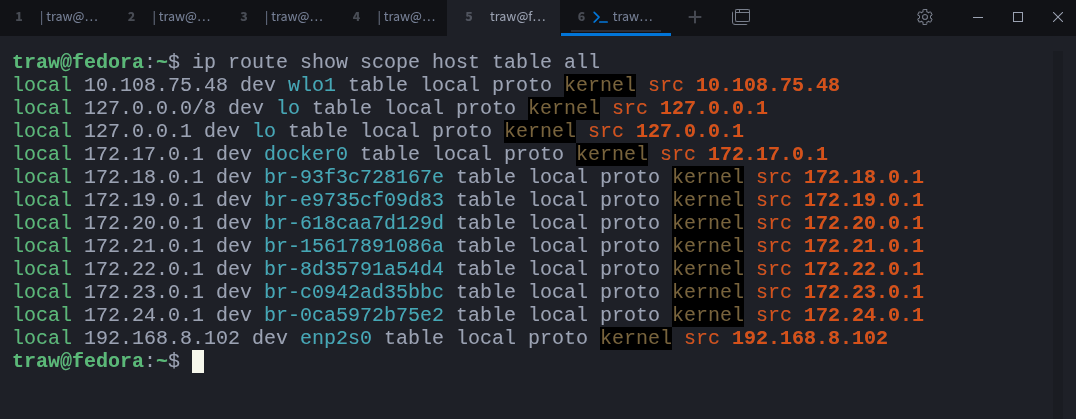
The loopback range appears as 127.0.0.0/8 because it is treated as a special local network. Any address within that range will always resolve back to the local system:
$ ping 127.2.4.23 -c 3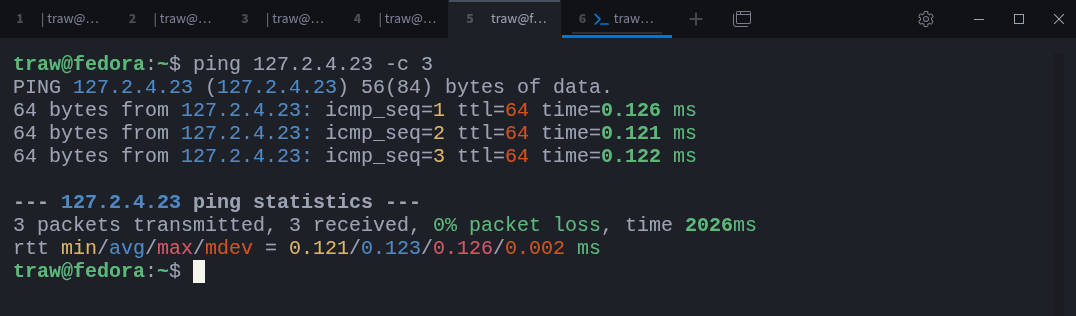
Even though the address looks arbitrary, the traffic never leaves the host.
Link scope routes apply to directly connected networks. These routes are used for destinations that can be reached without passing through a router. Traffic matching a link-scope route is sent directly out of the associated interface.
You can view link-scope routes with:
$ ip route show scope link table all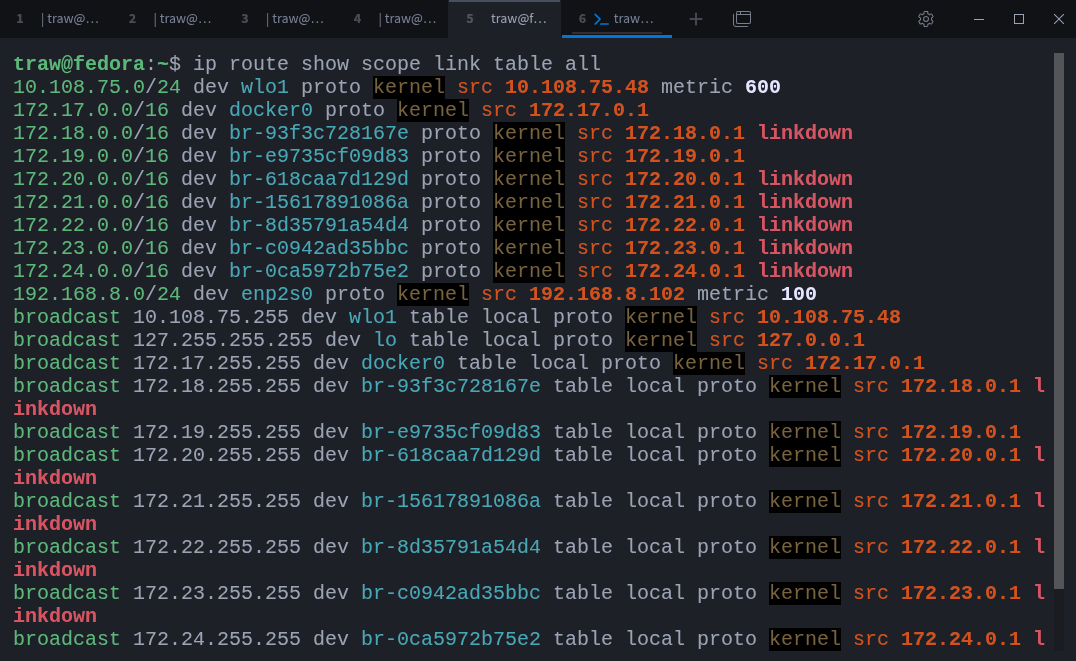
Alongside unicast routes, you’ll also see broadcast routes. Broadcast addresses target all hosts on a local network segment and are automatically created by the kernel for each connected network.
Global scope routes apply to destinations beyond the local system and its directly connected networks. These routes require one or more routers to reach the final destination. The default route is the most common example.
You can identify global-scope routes with:
$ ip -4 route show scope global table all
These routes act as catch-all paths for traffic that does not match any more specific destination.
Route scopes are not cosmetic labels. They allow the kernel to quickly eliminate routes that cannot possibly apply to a given destination, making route selection faster and more predictable.
Routing Tables
Linux does not store all routes in a single flat list. Instead, routes are grouped into routing tables. Each table represents a separate set of routing decisions that the kernel can consult when processing a packet.
You may have already noticed this in earlier commands, where we used table all to display routes from every table at once. By default, however, most commands operate on a single table unless told otherwise.
Linux ships with three routing tables by default.
The local table is a special table maintained by the kernel. It contains routes for addresses that belong to the local system itself, including interface addresses and loopback. This table cannot be modified directly.
You can view its contents with:
$ ip route show table local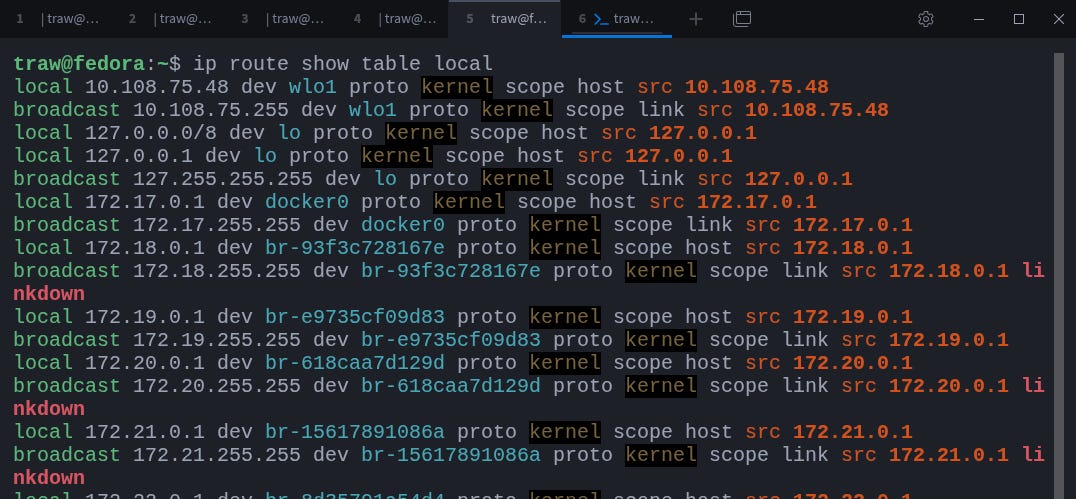
This table effectively maps local IP addresses to the interfaces they belong to. Any packet destined for one of these addresses is delivered locally and never forwarded.
The main table is where most routing decisions take place. Connected networks, static routes, and default gateways typically live here. When you add or remove routes without explicitly specifying a table, you are modifying the main table.
You can inspect it with:
$ ip route show table main
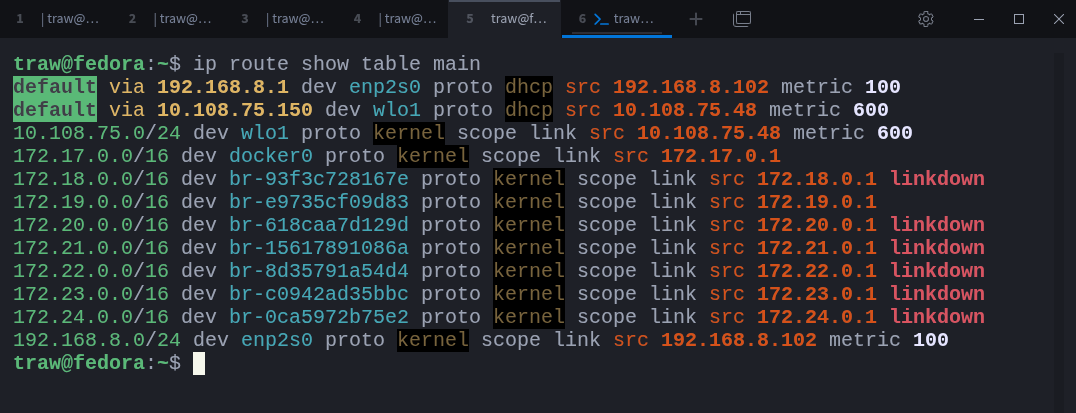
This table is populated automatically when interfaces come up, addresses are assigned (for example via DHCP), or routes are added manually.
The default table exists primarily for legacy compatibility and is rarely used directly on modern systems. In practice, routing decisions almost always involve the local and main tables unless policy-based routing is configured.
Each routing table is identified by a numeric ID. These IDs can be mapped to human-readable names using the rt_tables file:
$ cat /etc/iproute2/rt_tablesOn some distributions, such as Fedora, this file may not exist under /etc by default. In that case, the vendor-supplied definitions are located at:
/usr/share/iproute2/rt_tables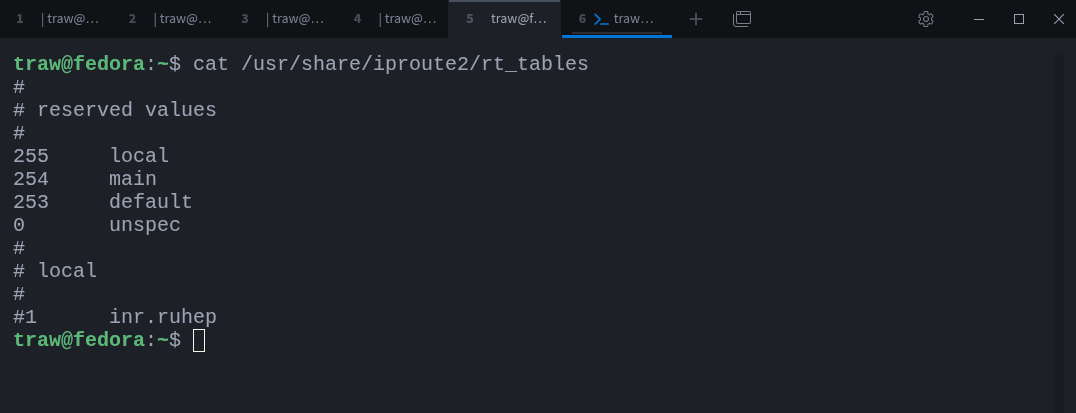
If /etc/iproute2/rt_tables is missing, it can be created manually. Entries placed there override or extend the system tables without modifying vendor files, which ensures they are not overwritten during package upgrades.
When working with routing commands, you can always refer to a table by its numeric ID if you prefer:
$ ip route show table 254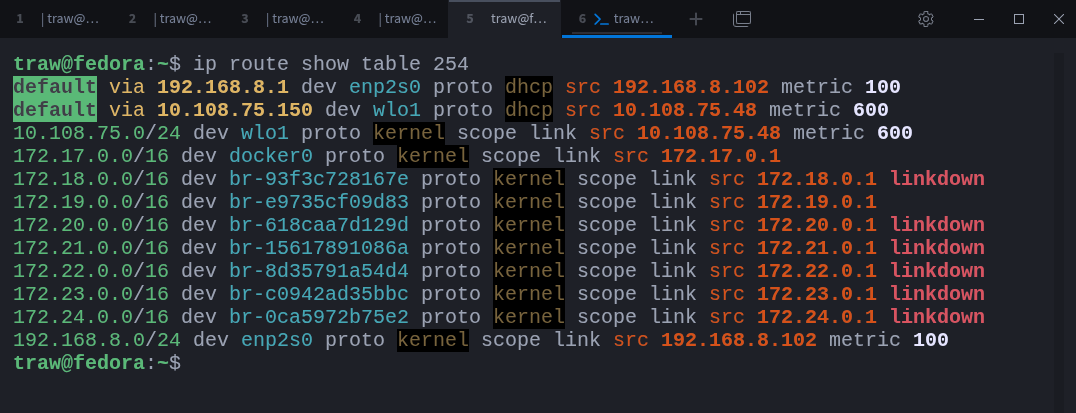
Linux supports up to 255 routing tables. This is not accidental or excessive; it enables advanced routing setups where traffic must be handled differently depending on its source, destination, or other attributes. We will explore those scenarios when we get to policy-based routing.
Route Selection
When multiple routes could match a destination, Linux follows a strict and well-defined selection process. This process is deterministic, which means the kernel will always make the same decision given the same routing information.
The most important rule is longest prefix match.
A route with a more specific destination always wins over a less specific one. A /32 prefix-length host route is preferred over a /25, a /25 is preferred over a /24, and any subnet route is preferred over a default route. This is why the default route is only used as a last resort, when no more specific route exists.
Once prefix length is considered, Linux looks at metrics.
If multiple routes have the same prefix length, the route with the lowest metric is selected. Metrics allow one route to be preferred over another even when both are otherwise equally valid.
You can see this clearly with multiple default routes:
$ ip route show default
Both routes match the same destination (0.0.0.0/0), but the route with metric 100 is preferred over the one with metric 600.
You can verify the decision the kernel makes with:
$ ip route get 1.1.1.1
Even though both default routes are valid, the packet is sent via 192.168.8.1 because it has the lower metric.
Metrics are commonly used to express preference or priority. A route with a higher metric can act as a backup path that is only used when the preferred route becomes unavailable.
Only when both prefix length and metric are equal does Linux consider more advanced mechanisms, such as equal-cost routing or equal-cost multi-path (ECMP). At that point, the kernel no longer selects a single “best” route, but instead treats multiple routes as equally valid candidates.
ECMP Routing
Linux supports Equal-Cost Multi-Path (ECMP) routing, which allows traffic to be distributed across multiple gateways when more than one route to a destination is equally valid. Instead of committing to a single next hop, the kernel can spread traffic across several paths at Layer 3.
Path selection in ECMP is not random. The kernel uses a hashing mechanism to decide which next hop a packet, or flow, should take. How predictable this behaviour is depends on the hashing policy in use.
To see ECMP in action, consider a route with two equal-cost gateways:
sudo ip route add 34.160.111.145 \
  nexthop via 192.168.8.1 dev enp2s0 weight 1 \
  nexthop via 10.108.75.150 dev wlo1 weight 1
This installs a route to 34.160.111.145 with two next hops of equal cost:
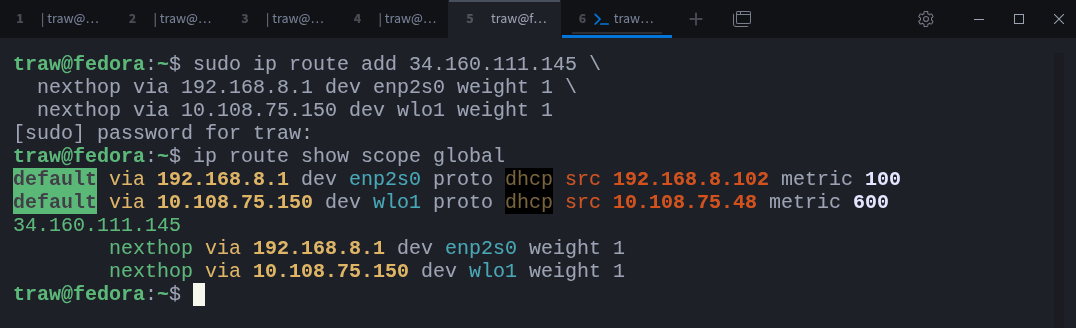
The address 34.160.111.145 belongs to ifconfig.me, a service that simply returns your public IP address. If you repeatedly run:
$ curl ifconfig.meyou might expect traffic to alternate between the two gateways. By default, that does not happen.
The reason lies in how Linux hashes ECMP traffic. You can inspect the current hashing policy with:
$ sysctl net.ipv4.fib_multipath_hash_policyOn most systems, the value is 0:

With this setting, the kernel hashes only on the destination IP address. All traffic sent to the same destination is therefore pinned to a single next hop. Source IP, source port, destination port, and protocol are ignored.
This behaviour is intentional. It provides stable and predictable routing decisions: every connection to the same server consistently uses the same gateway. The trade-off is limited load distribution. If many connections target a single destination, one link may carry all the traffic while others remain idle.
Enabling flow-based ECMP hashing
To distribute traffic at a finer granularity, the hashing policy can be changed to:
$ sudo sysctl -w net.ipv4.fib_multipath_hash_policy=1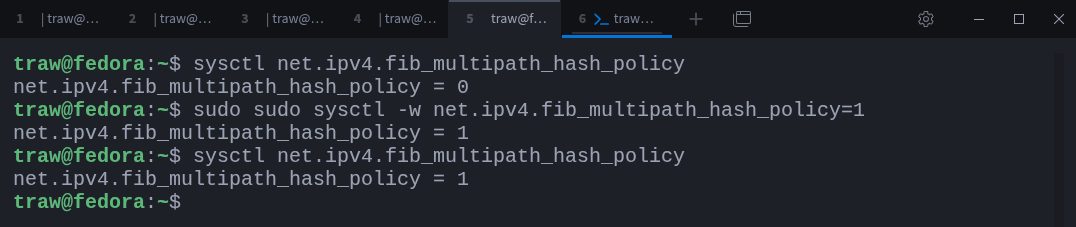
With this setting, the kernel hashes on the full five-tuple:
source IP
destination IP
source port
destination port
protocol
Each TCP or UDP flow is treated independently. This allows different connections to the same destination to use different next hops, resulting in much better load distribution.
The catch: asymmetric routing
Flow-based ECMP assumes that return traffic will follow the same path as outbound traffic. In environments where this assumption holds, such as controlled routed networks or data centers, this approach works well.
On a typical workstation or laptop, that assumption often breaks down.
In this example, the system is connected to two completely different ISPs: one via Ethernet and another via Wi-Fi. Each gateway performs its own NAT and has no awareness of the other path. When flow-based hashing is enabled, Linux is free to choose either interface for each new connection.
A TCP connection to ifconfig.me might begin with a SYN packet leaving over Wi-Fi. The upstream NAT on that gateway creates state for the connection and forwards it to the internet. A moment later, a retransmission or ACK is sent, but this time the ECMP hash selects the Ethernet path instead.
From the ISP’s point of view, that packet makes no sense.
It arrives on a different gateway, with a source address that does not match any existing NAT state, and without a corresponding connection entry. The packet is silently dropped. Nothing is misconfigured on the Linux host, yet the connection stalls.
From the user’s perspective, the behaviour appears random:
$ curl ifconfig.me   → works
$ curl ifconfig.me   → hangs
$ curl ifconfig.me   → works again
This is asymmetric routing in practice. Linux did exactly what it was told to do, but the surrounding network could not support it. Consumer ISPs in particular are unforgiving of this pattern.
This behaviour explains why Linux does not enable flow-based ECMP by default.
In most environments, the kernel cannot assume symmetric return paths. Gateways may belong to different networks, NAT is almost always involved, and upstream routing is outside the host’s control. In such conditions, aggressive load distribution is more likely to break connections than improve throughput.
By defaulting to destination-based hashing, Linux chooses predictability over maximum utilisation. Traffic to the same destination remains pinned to a single path, NAT state remains consistent, and connections stay stable, even on multi-homed workstations and laptops.
Metric vs Weight
You may have noticed that when creating an ECMP route, we did not explicitly set a metric:
$ sudo ip route add 34.160.111.145 \
  nexthop via 192.168.8.1 dev enp2s0 weight 1 \
  nexthop via 10.108.75.150 dev wlo1 weight 1
This is because ECMP routes are, by definition, equal-cost routes. All next hops within an ECMP route implicitly share the same metric. If no metric is specified, the default value is used.
You can still assign a metric explicitly if needed:
$ ip route del 34.160.111.145

$ sudo ip route add 34.160.111.145 metric 100 \
  nexthop via 192.168.8.1 dev enp2s0 weight 1 \
  nexthop via 10.108.75.150 dev wlo1 weight 1
Which results in:
$ ip route show scope global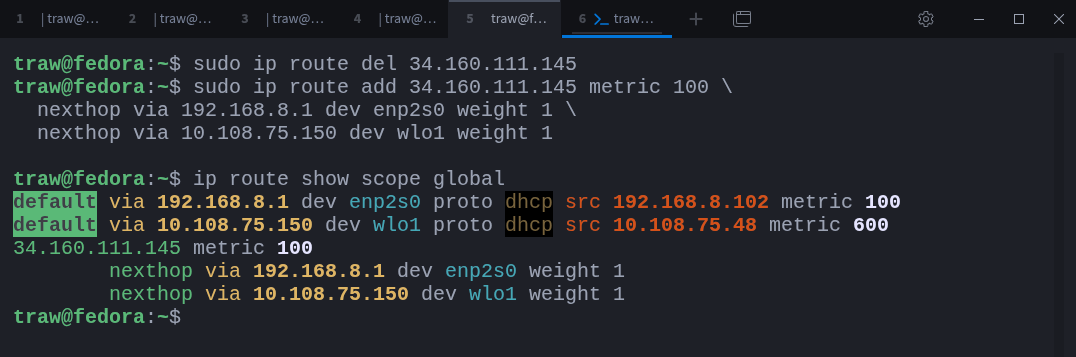
In this case, the metric applies to the route as a whole, not to individual next hops.
What metrics are used for
A metric is used to compare different routes to the same destination.
When multiple routes exist, the kernel first applies longest prefix match. If prefix lengths are equal, the route with the lowest metric is preferred. Metrics are therefore used to express preference, priority, or backup behaviour between routes.
For example, a route with a higher metric may exist purely as a fallback and will only be used if the preferred route becomes unavailable.
What weights are used for
A weight, on the other hand, is used within an ECMP route.
Weights control how traffic is distributed across multiple equal-cost next hops. When all next hops have the same weight, traffic is distributed evenly. When weights differ, traffic is split proportionally.
For example, assigning a weight of 3 to one next hop and 1 to another results in an approximate 3:1 traffic split, or roughly 75/25.
Weights do not influence route selection. They only influence traffic distribution after a route has already been selected.
So, in simple words:
Metric determines which route is preferred when multiple routes match the same destination.
Weight determines how traffic is distributed across multiple next hops within a single ECMP route.
Both serve different purposes and operate at different stages of the routing decision process.
Special Routes
Not all routes exist to deliver traffic. Some routes exist specifically to control what happens when traffic matches them.
Linux supports several special route types that change how packets are handled when a destination is matched.
An unreachable route tells the kernel that a destination cannot be reached. When a packet matches such a route, the kernel immediately rejects it and sends an ICMP destination unreachable message back to the sender.
You can create an unreachable route like this:
$ sudo ip route add unreachable 1.1.1.1The same can be applied to an entire subnet:
$ sudo ip route add unreachable 192.168.10.0/24A prohibit route is similar, but slightly stricter. When traffic matches a prohibit route, the kernel rejects it with an ICMP administratively prohibited message.
$ sudo ip route add prohibit 1.1.1.1This type of route is often used to explicitly deny traffic while still providing feedback to the sender.
A blackhole route silently drops packets. No response is sent back to the sender.
$ sudo ip route add blackhole 1.1.1.1Because there is no feedback, blackhole routes are commonly used for traffic filtering, denial-of-service mitigation, or to prevent unwanted traffic from consuming resources.
Blackhole routes are also frequently used in routing protocols such as BGP. A route may need to exist in the routing table so it can be advertised, even though no traffic should actually be forwarded.
Another common use case is site-to-site VPNs. If traffic for a remote subnet should only ever traverse a tunnel, a blackhole route can prevent that traffic from leaking out through a default gateway when the tunnel is down.
Special routes do not replace firewall rules, but they complement them. They operate directly at the routing layer and influence packet handling before any forwarding decision is made.
Routing Rules and Policy-Based Routing (PBR)
So far, routing decisions have been based entirely on the destination address. That works well in simple setups, but it quickly becomes limiting once traffic needs to be treated differently depending on where it comes from or how it enters the system.
Policy-based routing (PBR) addresses this limitation by introducing routing rules.
Instead of always consulting the same routing table, Linux maintains a rule database that determines which routing table should be used for a given packet. Only after a table is selected does the kernel perform normal route lookup within that table.
You can view the current set of routing rules with:
$ ip rule show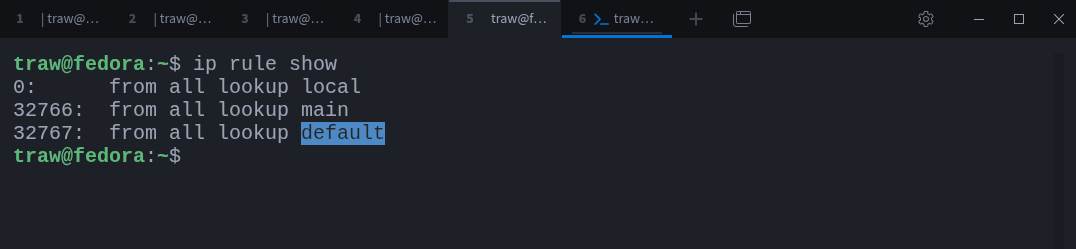
Rules are evaluated in order, from top to bottom. As soon as a rule matches, the kernel consults the routing table associated with that rule. If a suitable route is found, the lookup stops.
This mechanism makes it possible to base routing decisions on more than just the destination address. Rules can match on source address, destination address, incoming interface, firewall marks, and other attributes.
If you are familiar with enterprise firewalls such as FortiGate or Check Point, this approach should feel familiar. In those platforms, most routing decisions are also policy-driven rather than purely destination-based.
A common use case for policy-based routing is multi-WAN routing, where traffic must exit through different internet connections depending on its characteristics.
To demonstrate this, we can create two custom routing tables and populate each with a different default gateway.
First, define the routing tables:
$ sudo mkdir -p /etc/iproute2

$ echo "200     wan-wifi" | sudo tee -a /etc/iproute2/rt_tables
$ echo "201     wan-ethernet" | sudo tee -a /etc/iproute2/rt_tables
Next, add a default route to each table:
$ sudo ip route add default via 10.108.75.150 dev wlo1 table wan-wifi
$ sudo ip route add default via 192.168.8.1  dev enp2s0 table wan-ethernet
You can verify the contents of each table with:
$ ip route show table wan-wifi
$ ip route show table wan-ethernet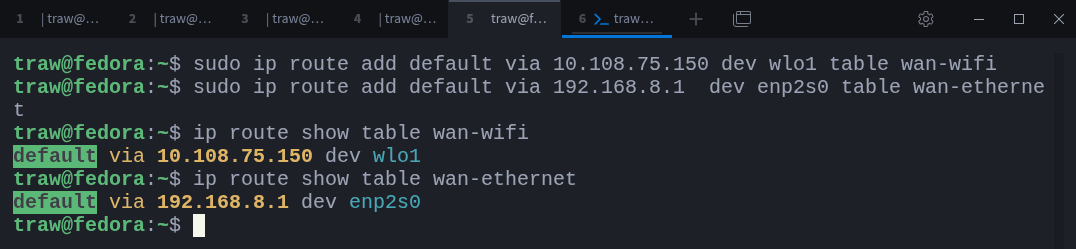
At this point, the routes exist, but they are not used yet. The kernel still relies on the main routing table unless instructed otherwise.
Now we can introduce policy rules.
In this example, traffic destined for ifconfig.me (34.160.111.145) will be routed via Wi-Fi, while traffic destined for ifconfig.co (104.21.54.91) will be routed via Ethernet:
$ sudo ip rule add to 34.160.111.145 table wan-wifi
$ sudo ip rule add to 104.21.54.91 table wan-ethernet
Displaying the rules again shows the new entries:
$ ip rule show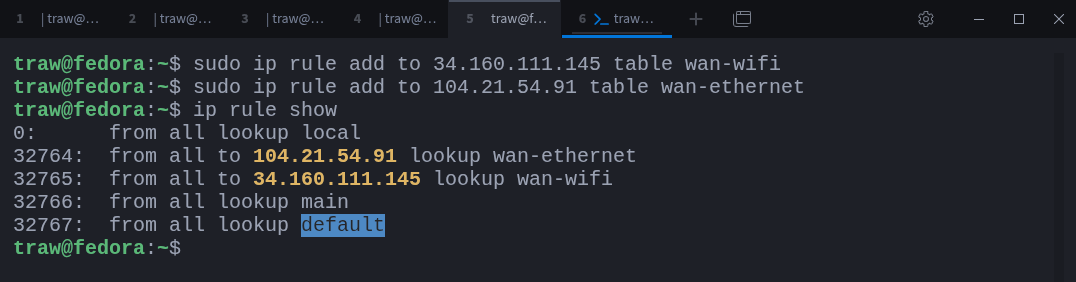
The ordering is important. These rules are evaluated before the main table, so matching traffic is redirected to the appropriate routing table.
Testing confirms the behaviour:
$ curl ifconfig.me
$ curl ifconfig.co
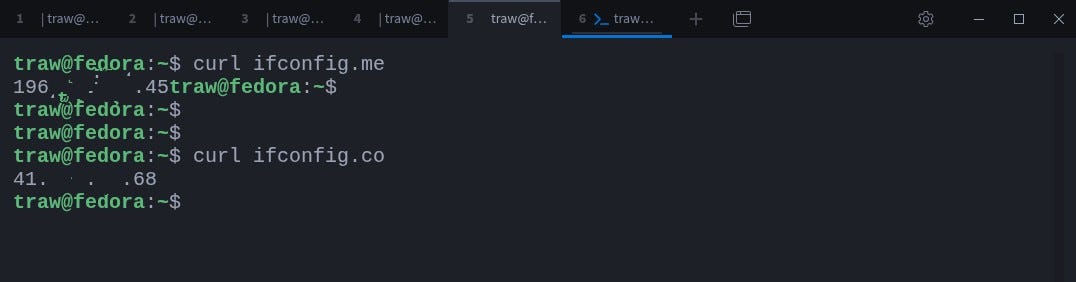
Each destination uses a different outbound interface and therefore returns a different public IP address.
Policy-based routing can be applied in many ways. When a system acts as a router, rules commonly match on the source address using from. When more granular control is needed, rules can match on both from and to, or on other attributes entirely.
Routing Marks
One of the most powerful routing mechanisms in Linux is the firewall mark.
A firewall mark is a numeric tag that can be attached to packets as they pass through the system. Routing rules can then match on that mark and select a routing table accordingly.
This adds another layer of flexibility to policy-based routing. Instead of matching only on addresses or interfaces, routing decisions can be influenced by anything the firewall is able to inspect or classify.
The idea is simple:
The firewall marks the packet.
The routing rules interpret that mark.
The kernel selects the appropriate routing table.
Routing itself still happens at Layer 3. The firewall does not route traffic; it only labels packets. The routing subsystem then uses those labels to decide where packets should go.
This approach allows routing decisions to be based on a wide range of criteria, including:
incoming or outgoing interface
source or destination address
protocol or port
connection state
application-specific characteristics
Because marking happens before routing decisions are made, it integrates cleanly with the existing policy routing framework.
Firewall marks are commonly used in more advanced setups, such as:
complex multi-WAN designs
VPN traffic segregation
service-specific routing
selective traffic steering
The key advantage is separation of concerns. The firewall focuses on classification, while the routing subsystem focuses on path selection. This keeps configurations easier to reason about and avoids overloading routing rules with complex matching logic.
Routing marks are a deep topic on their own and deserve a dedicated discussion. We will explore them in more detail in a separate article.
Thanks for reading!
If you enjoyed this content, don’t forget to leave a comment, like ❤️ and subscribe to get more posts like this every week.