

In the previous article in our Networking in Linux series, we took a deep dive into routing and looked at how the Linux kernel decides where packets should go.
When an application wants to communicate with another host, the kernel looks at the available routing information, determines the best path to the destination, and sends the packet through the appropriate network interface.
For a typical Linux machine connected to a local network, that path might look something like this:
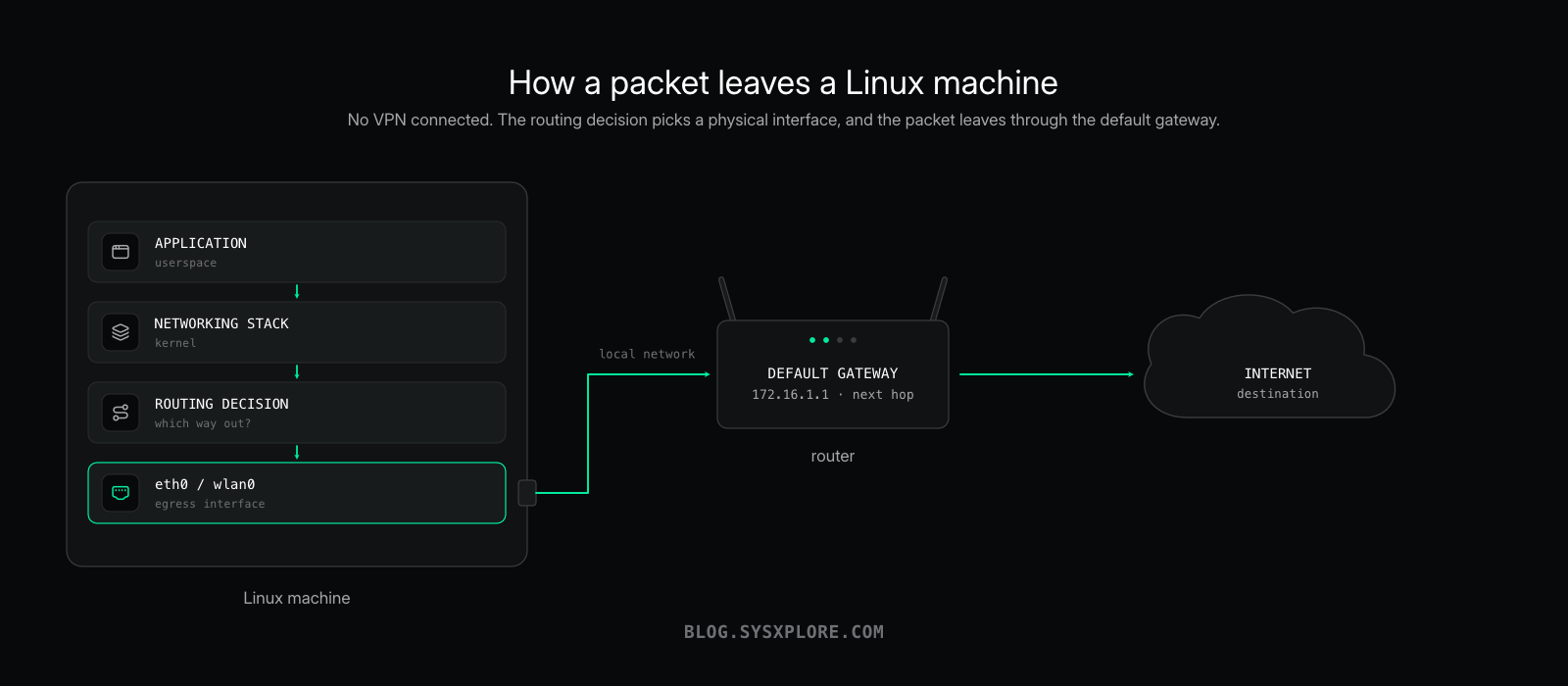
But what happens to this path when you connect to a VPN?
Suddenly, there is another interface in the picture. The routing configuration changes. Traffic that previously left your machine through eth0 or wlan0 is now being directed through a VPN tunnel, yet somehow those packets still have to leave through the physical network interface to reach the VPN server.
So what exactly is happening behind the scenes?
That is what we are going to explore in this article.
Rather than spending much time on what a VPN is or why you might use one, we are going to look at it from a networking perspective. We’ll inspect the interfaces, routing tables, and policy-routing rules before and after connecting to a VPN and see exactly how the path Linux chooses for our Internet traffic changes.
This article is sponsored by Proton VPN, and throughout the article I will be using Proton VPN on Linux as our real-world implementation while we investigate what is happening underneath.
Before we connect to it, though, we need a baseline.
Let’s see what our network looks like without a VPN.
Before We Connect the VPN
Before connecting to Proton VPN, let’s establish what our network currently looks like.
We already know from our previous discussion on Linux routing that when an application sends traffic to a remote destination, the Linux kernel needs to determine where that traffic should go. It does this using the routing information available on the system.
Right now, there is no VPN involved, so let’s first look at the interfaces available on our machine:
$ ip -c addrThe output is quite long, so I’ve trimmed it down to the parts we’re interested in:
2: enp2s0: <BROADCAST,MULTICAST,UP,LOWER_UP> mtu 1500 ...
    link/ether c8:53:09:8c:57:a9 brd ff:ff:ff:ff:ff:ff
    inet 172.16.1.17/24 brd 172.16.1.255 scope global dynamic noprefixroute enp2s0

3: wlp3s0: <BROADCAST,MULTICAST,UP,LOWER_UP> mtu 1500 ...
    link/ether 7e:01:79:88:e9:4a brd ff:ff:ff:ff:ff:ff
    inet 192.168.8.53/24 brd 192.168.8.255 scope global dynamic noprefixroute wlp3s0
There are two active network interfaces on this machine.
enp2s0 is our Ethernet interface and has been assigned 172.16.1.17/24, while wlp3s0 is our wireless interface and has been assigned 192.168.8.53/24.
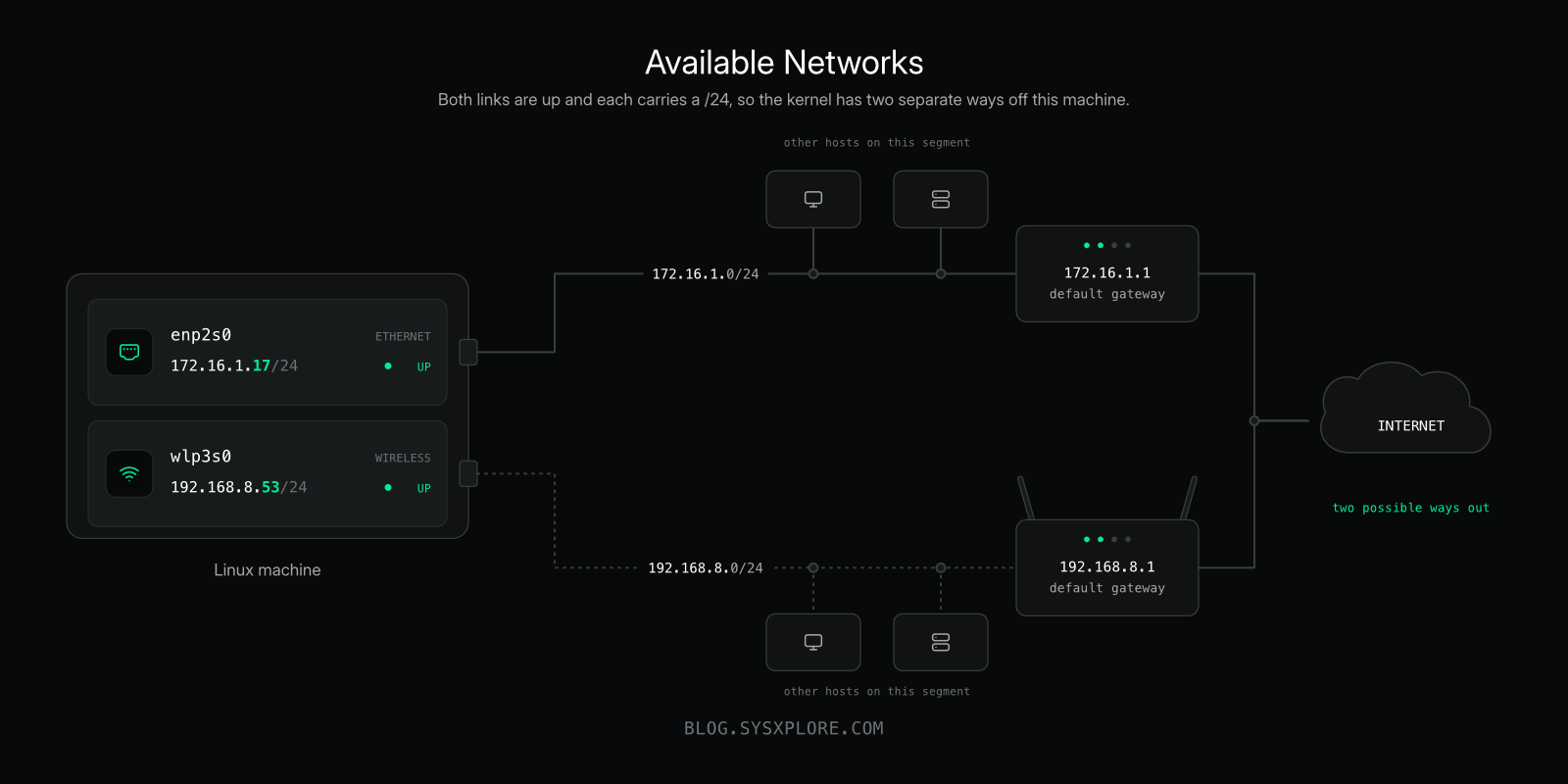
Both interfaces are up and connected to different networks.
This makes our example a little more interesting because Linux potentially has two ways to reach the Internet.
Let’s look at the routing table:
$ ip routedefault via 172.16.1.1 dev enp2s0 proto dhcp src 172.16.1.17 metric 100
default via 192.168.8.1 dev wlp3s0 proto dhcp src 192.168.8.53 metric 600
172.16.1.0/24 dev enp2s0 proto kernel scope link src 172.16.1.17 metric 100
192.168.8.0/24 dev wlp3s0 proto kernel scope link src 192.168.8.53 metric 600Notice that we don’t have just one default route. We have two:
default via 172.16.1.1 dev enp2s0 metric 100
default via 192.168.8.1 dev wlp3s0 metric 600
Both match destinations for which Linux doesn’t have a more specific route, but the kernel still needs to choose between them.
Since these routes have the same prefix length, their metrics help determine which one is preferred. A lower metric represents the preferred route.
In our case:
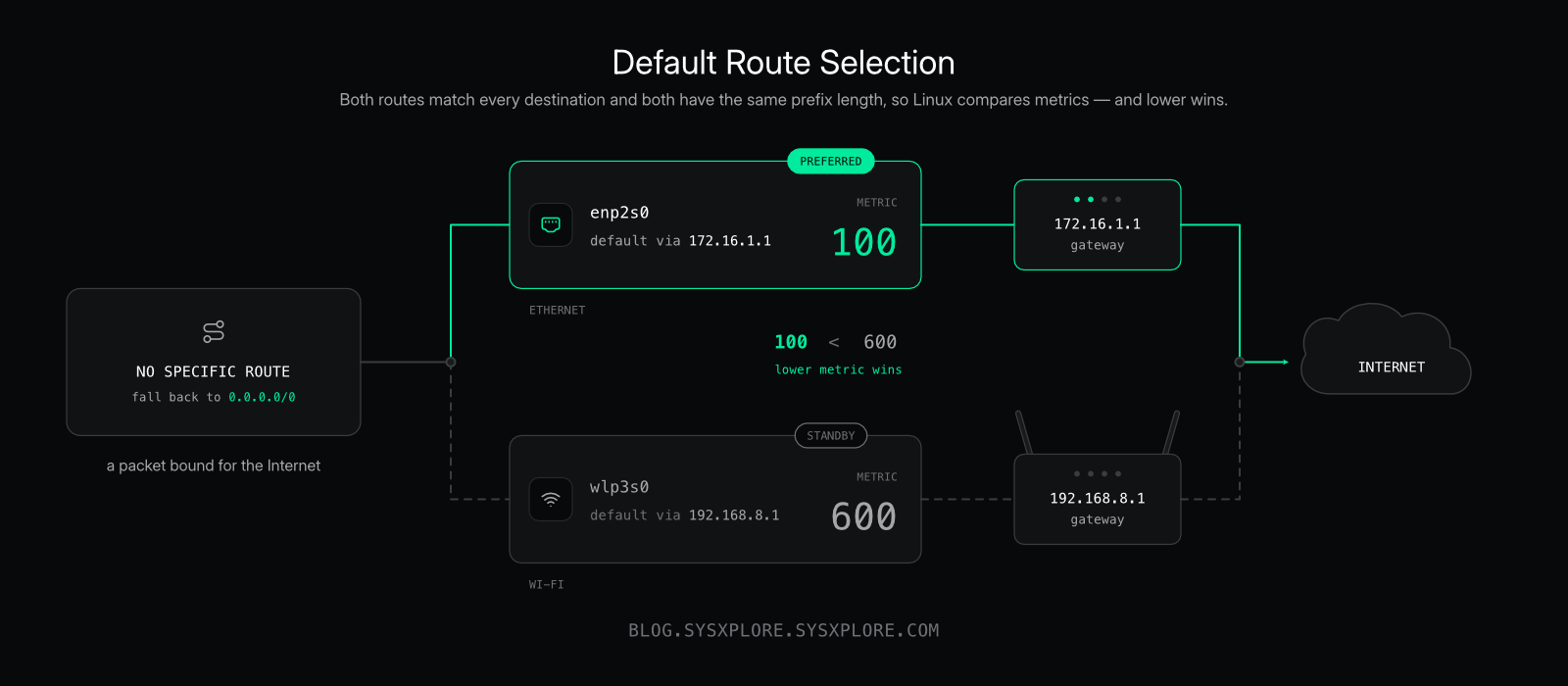
So we expect Linux to prefer enp2s0 when sending ordinary Internet traffic.
If you want a deeper explanation of how Linux evaluates routes, route specificity, metrics, routing tables and policy-based routing, I covered those in Networking in Linux: Routing Deep Dive.
For now, we don’t have to rely on our interpretation of the routing table. We can simply ask the kernel which route it would use to reach a specific destination:
$ ip route get 1.1.1.1And sure enough:
1.1.1.1 via 172.16.1.1 dev enp2s0 src 172.16.1.17 uid 1000
    cache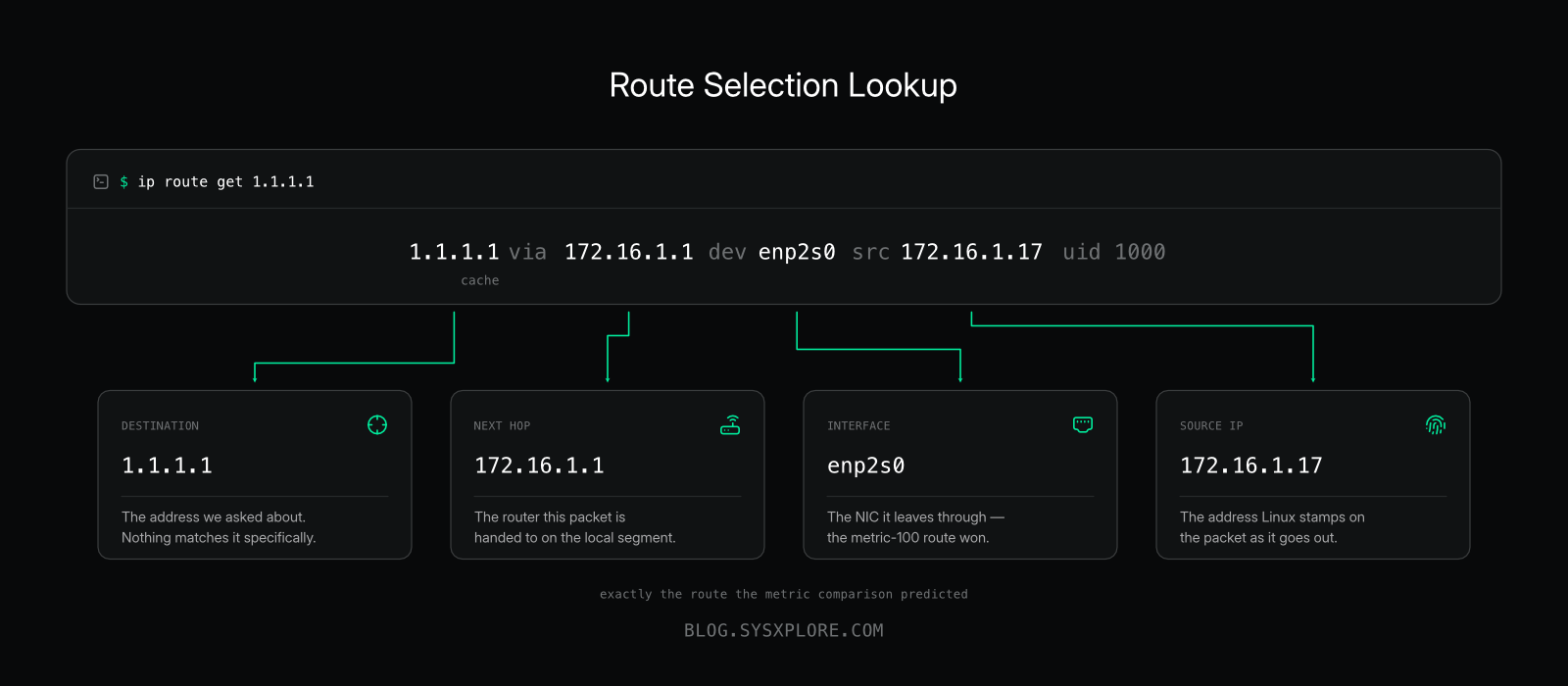
Linux has selected the Ethernet path:
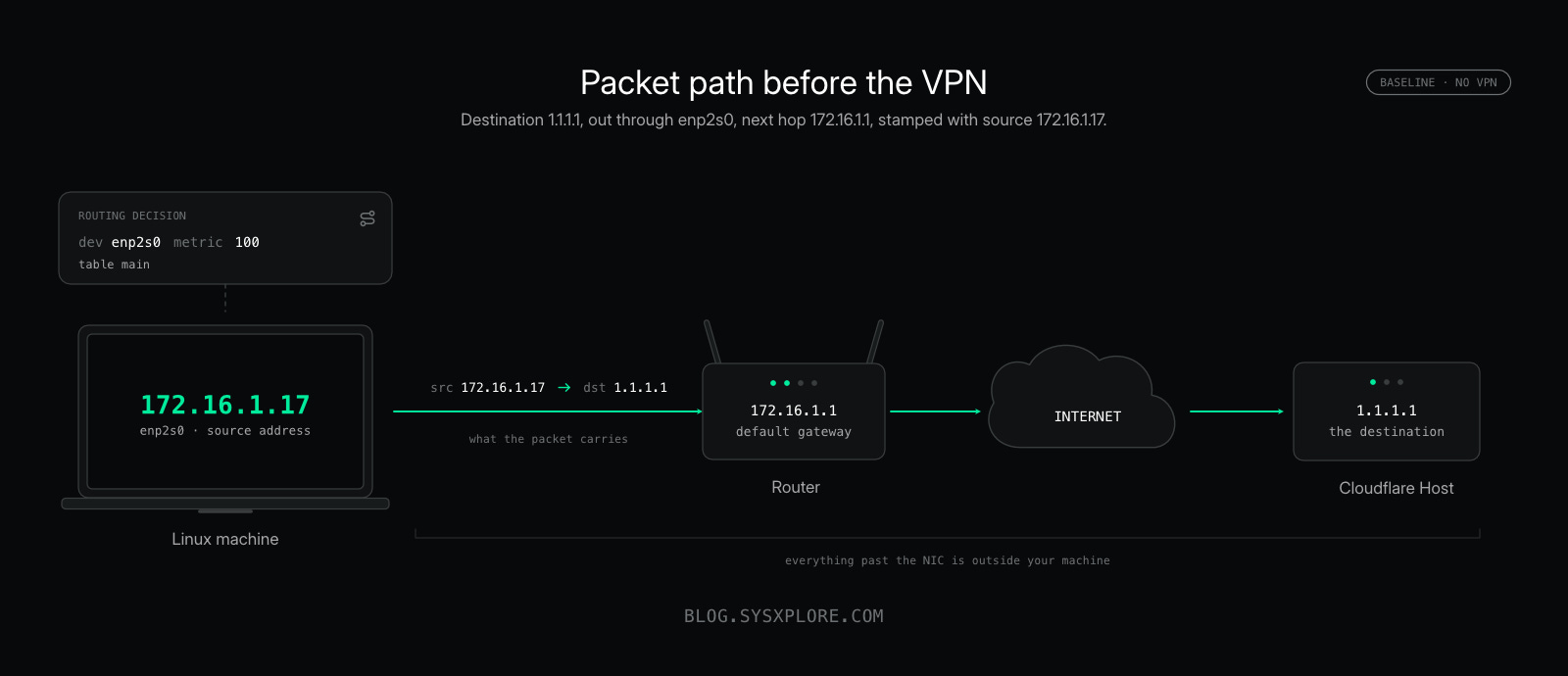
The destination is 1.1.1.1, the next hop is 172.16.1.1, the packet will leave through enp2s0, and Linux has selected 172.16.1.17 as the source address for this route.
So before connecting the VPN, our packet path looks roughly like this:
At the IP layer, a packet destined for 1.1.1.1 would therefore look something like this:
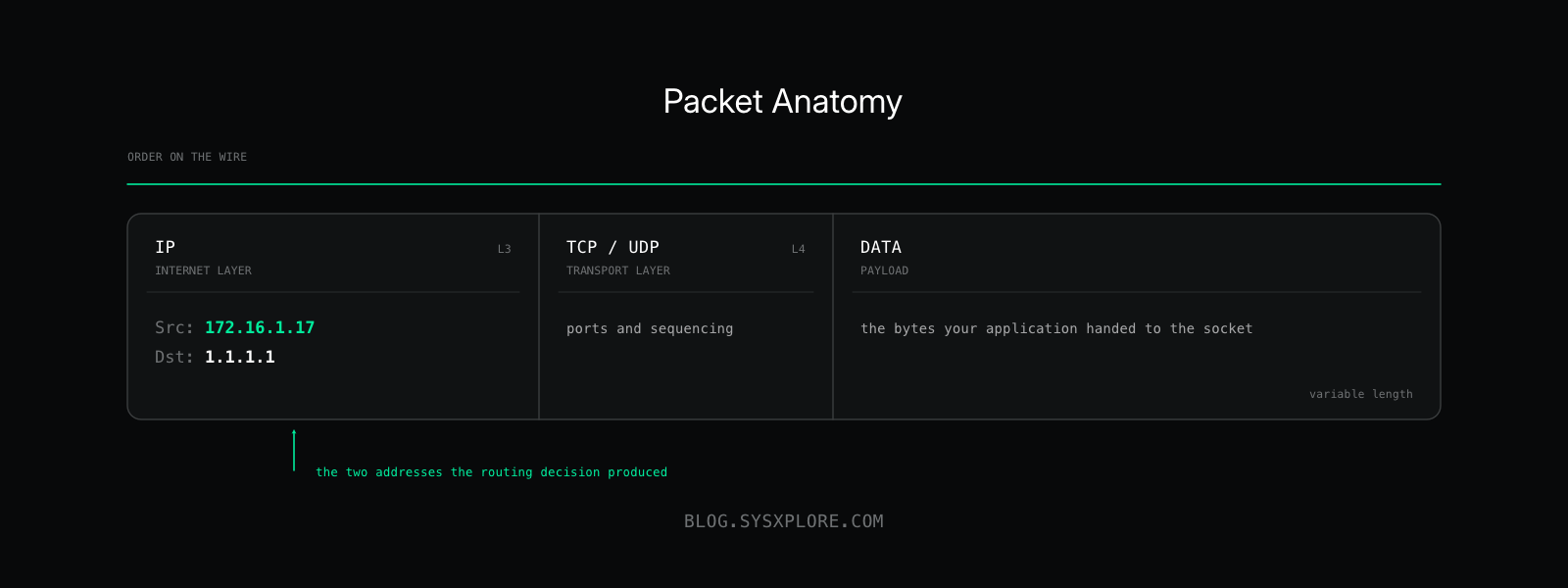
NOTE:This is intentionally simplified. There is more involved when the packet is actually transmitted, including Ethernet frame headers, the FCS, and other details. For now, we’re focusing only on the IP-layer information relevant to our investigation.
There is one more thing we want to record before connecting the VPN: the policy routing rules.
$ ip ruleOur system currently has:
0:      from all lookup local
32766:  from all lookup main
32767:  from all lookup default
These are the standard rules telling Linux which routing tables to consult. The numbers on the left are priorities, with lower values evaluated first.
We already covered routing rules and policy-based routing in Networking in Linux: Routing Deep Dive, so we won’t go through them again here. For now, we simply want to record the rules that exist before connecting to the VPN. Later, we’ll run the same command again and see whether anything has changed.
We have two active physical interfaces, two possible default routes, and Linux currently prefers the Ethernet connection. Traffic toward 1.1.1.1 is sent through enp2s0 to 172.16.1.1, using 172.16.1.17 as the source address.
That’s our baseline.
Now let’s connect to Proton VPN and run these commands again.
Things are about to get more interesting.
Connect the VPN: What Changed?
We now have a pretty good picture of how traffic leaves our Linux machine without a VPN. I’m going to connect to a Proton VPN server and then run some of the same commands again.
I’m a huge fan of the command line. If something can be done easily from the terminal, I’ll almost always choose the terminal over a GUI. Well, except for browsing the web and maybe watching a few videos.
So, to connect to Proton VPN, I’ll be using the Proton VPN CLI for Linux.
I’m not going to cover how to install or use the Proton VPN CLI in this article, since that’s not really what we’re here for. But if you’d like to follow along from the terminal, Proton has documentation that walks you through it: Using Proton VPN on Linux with the CLI.
And if you prefer using the Proton VPN GUI, go for it. There’s no right or wrong way to connect here. What we’re interested in is what happens to our Linux networking configuration after that connection is established.
With that out of the way, let’s connect:
$ protonvpn connect --country US

Connected to US-MA#127 in Boston, United States.

Your new IP address is 159.26.101.55.
We’re connected.
Now let’s see what changed.
Let’s start by looking at our network interfaces again:
$ ip -c addrOur Ethernet and Wi-Fi interfaces are still there with the same addresses, but there are now two interfaces that weren’t present before:
5: proton0: <POINTOPOINT,NOARP,UP,LOWER_UP> mtu 1420 ...
    link/none
    inet 10.2.0.2/32 scope global noprefixroute proton0
    inet6 2a07:b944::2:2/128 scope global noprefixroute

6: ipv6leakintrf0: <BROADCAST,NOARP,UP,LOWER_UP> mtu 1500 ...
    link/ether 6a:4c:45:3b:bb:6f brd ff:ff:ff:ff:ff:ff
    inet6 fdeb:446c:912d:8da::/64 scope global noprefixroute
Interesting.
Before connecting to Proton VPN, we had:
lo
enp2s0
wlp3s0
Now we have:
lo
enp2s0
wlp3s0
proton0          ← new
ipv6leakintrf0   ← new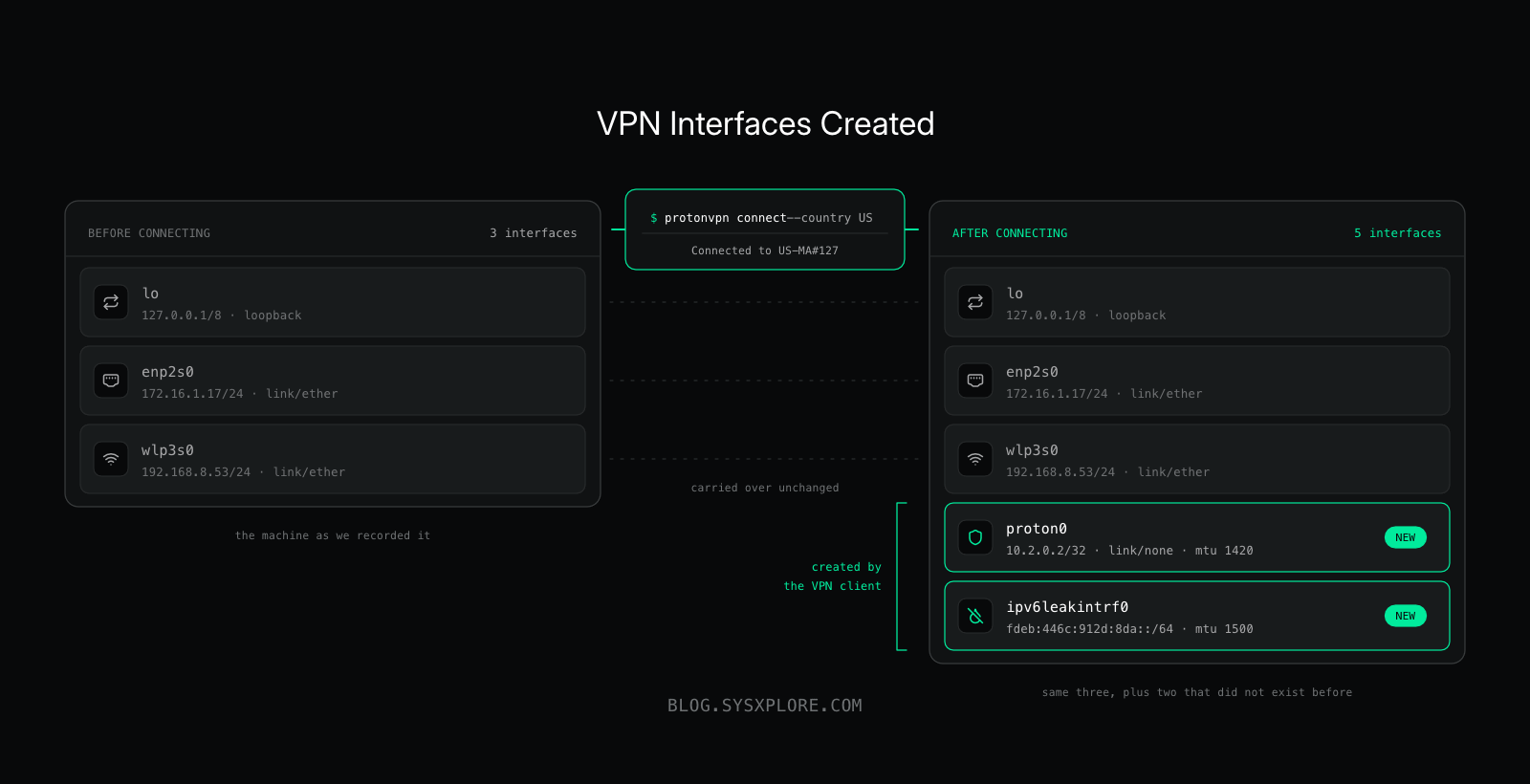
proton0 has also been assigned the IPv4 address 10.2.0.2/32, along with an IPv6 address.
The second interface, ipv6leakintrf0, has also appeared. Its name already gives us a pretty good clue about why it exists, but let’s leave that one alone for now. We’ll come back to IPv6 leakage later.
For the moment, proton0 is the interface we’re interested in.
But simply creating a new interface doesn’t automatically mean Linux will start sending Internet traffic through it. The kernel still needs routing information that tells it when to use that interface.
So let’s look at our routing table again:
$ ip routedefault via 172.16.1.1 dev enp2s0 proto dhcp src 172.16.1.17 metric 100
default via 192.168.8.1 dev wlp3s0 proto dhcp src 192.168.8.53 metric 600
172.16.1.0/24 dev enp2s0 proto kernel scope link src 172.16.1.17 metric 100
192.168.8.0/24 dev wlp3s0 proto kernel scope link src 192.168.8.53 metric 600Wait a minute.
That looks exactly like it did before we connected to the VPN.
Our preferred default route is still:
default via 172.16.1.1 dev enp2s0 metric 100There isn’t even a route through proton0 here.
If we only looked at the main routing table, we might reasonably wonder how our traffic is being sent through the VPN at all.
This is where the routing rules we recorded earlier become important.
Let’s look at them again:
$ ip ruleBefore connecting to Proton VPN, we had:
0:      from all lookup local
32766:  from all lookup main
32767:  from all lookup default
After connecting, we have:
0:      from all lookup local
31618:  from all lookup main suppress_prefixlength 0
31619:  not from all fwmark 0xea13b2c lookup 245447468
32766:  from all lookup main
32767:  from all lookup default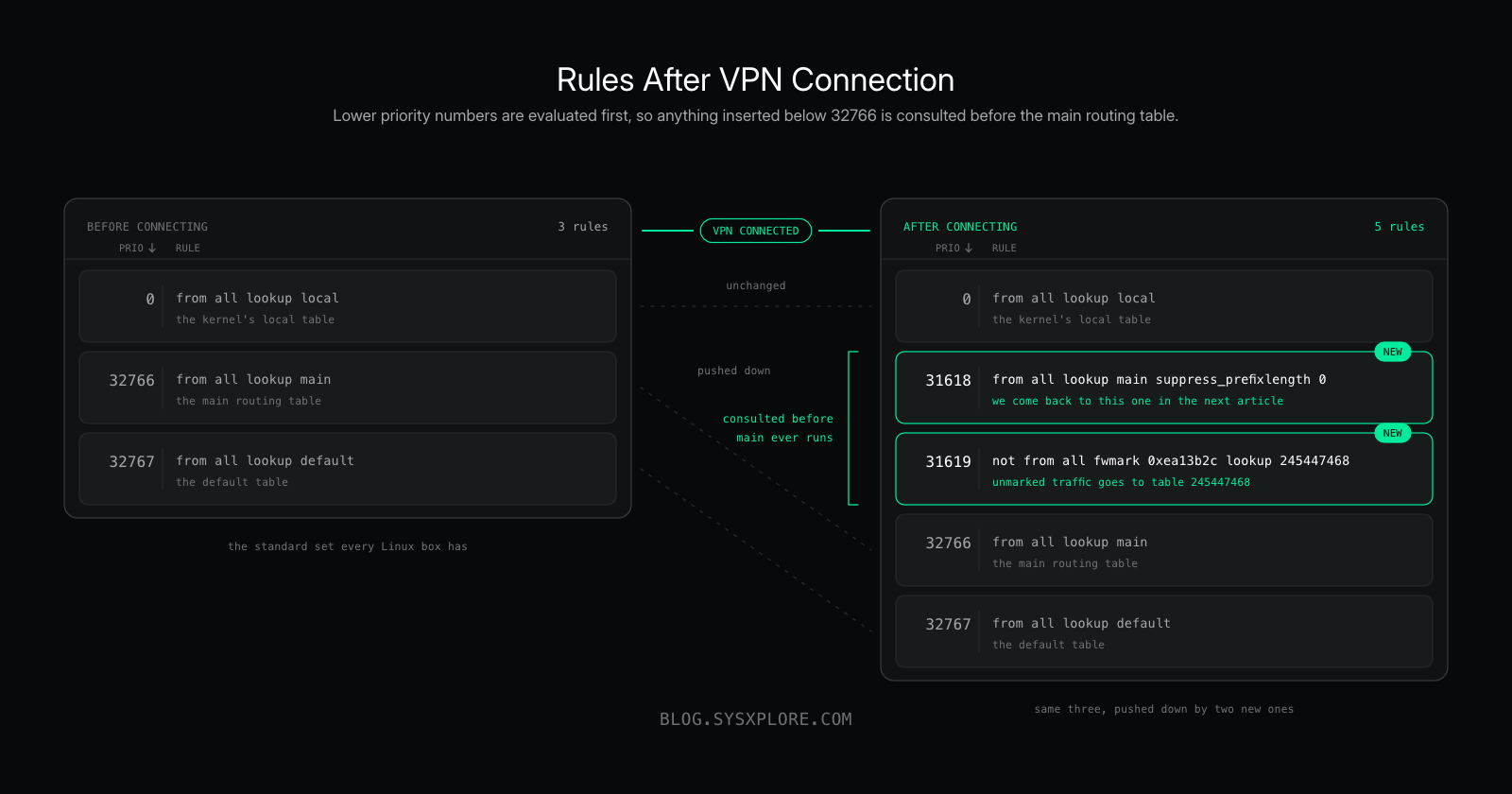
Notice that thelocalrule is still sitting at the top:
0: from all lookup localThat rule handles traffic destined for the Linux machine itself, such as traffic to one of its own addresses or locally hosted services. Proton hasn’t changed its priority because that traffic shouldn’t be redirected into the VPN tunnel.
The interesting changes for us are the two new rules immediately below it.
Now we’re getting somewhere.
Proton has added two policy-routing rules:
31618:  from all lookup main suppress_prefixlength 0
31619:  not from all fwmark 0xea13b2c lookup 245447468
And one of those rules references a routing table we didn’t have to think about before:
245447468Let’s see what’s inside it.
$ ip route show table 245447468And there it is:
default dev proton0 proto static scope link metric 50This is an important part of what Proton has changed.
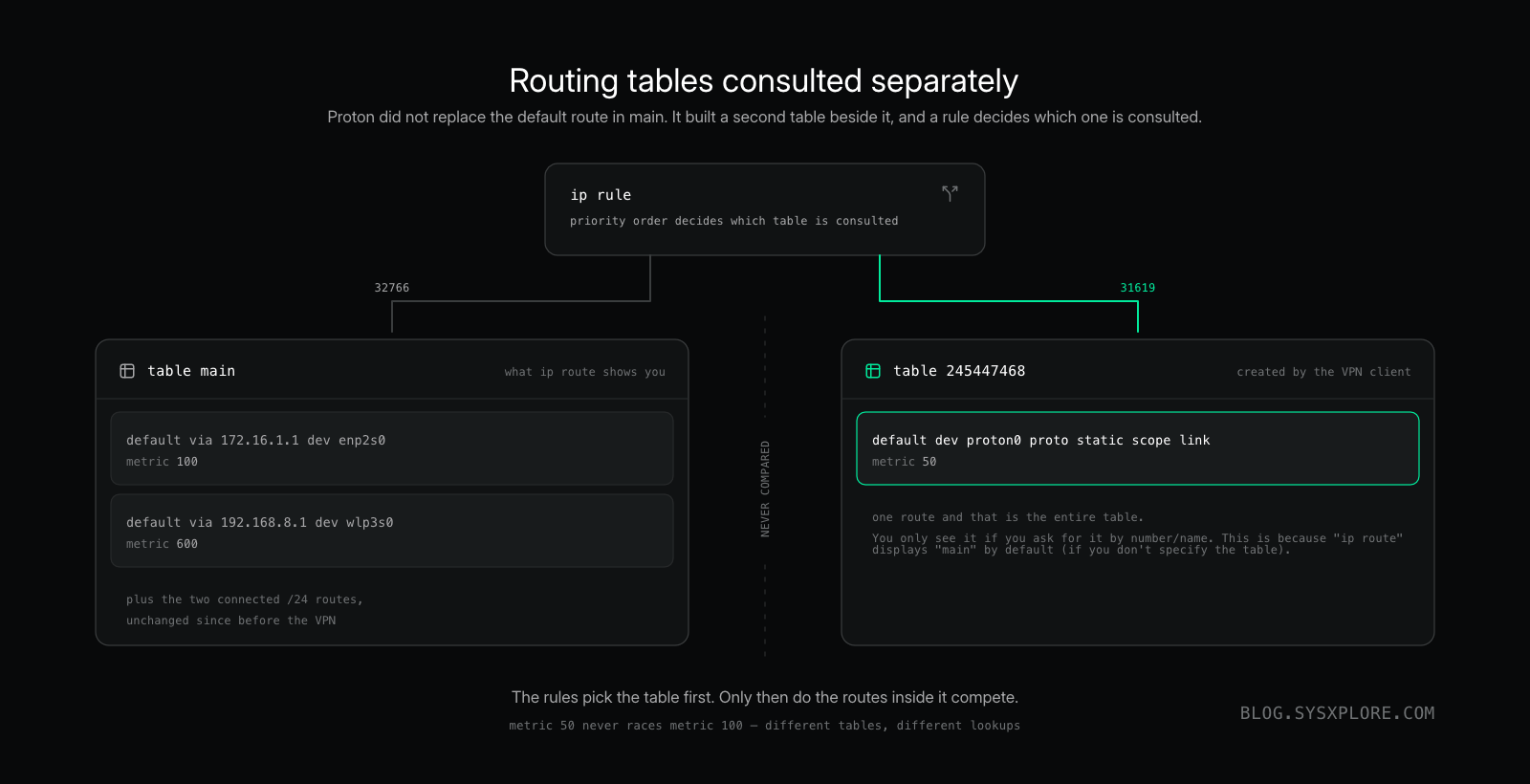
Instead of replacing the default route in our main routing table, Proton has created a separate routing table containing a default route through proton0.
NOTE: You might also notice that the default route through
proton0has a metric of50, which is lower than the metrics of100and600on our physical default routes. However, don’t conclude thatproton0is selected simply because it has the lowest metric. These routes live in different routing tables. The policy-routing rules determine which table gets consulted, and then the routes within the relevant table participate in that lookup.
We can visualize the relevant pieces like this:
A quick word about Proton VPN
This article is made possible by Proton VPN.
Proton VPN has apps for Linux, Windows, macOS, Android, iOS, and more, plus a Linux CLI for those who prefer the terminal. Its apps are open source and independently audited, and it supports multiple VPN protocols, including WireGuard, OpenVPN, and its own Stealth protocol.

Proton has also provided an exclusive discount for SYSXPLORE readers:65% off the 2-year VPN Plus plan or 55% off the 1-year VPN Plus plan when you sign up through the link below.
Now, back to our routing table.
The policy-routing rules determine when Linux should consult that additional table.
There is another interesting detail in this rule:
not from all fwmark 0xea13b2c lookup 245447468Linux packet marks, or fwmark (firewall marks), can be used together with policy routing to make different routing decisions for different packets.
In this case, traffic that does not carry the specified mark can be directed to table 245447468, where the default route points to proton0.
We’ll come back to why some traffic needs to be treated differently in the next article. That detail becomes very important when we ask how the VPN tunnel itself reaches the Proton VPN server.
For now, let’s ask Linux the same question we asked before connecting:
$ ip route get 1.1.1.1Before the VPN:
1.1.1.1 via 172.16.1.1 dev enp2s0 src 172.16.1.17 uid 1000
    cache
After connecting to Proton VPN:
1.1.1.1 dev proton0 table 245447468 src 10.2.0.2 uid 1000
    cache
There it is.
The destination hasn’t changed.
We’re still asking Linux how it would reach 1.1.1.1.
But the routing decision has completely changed.
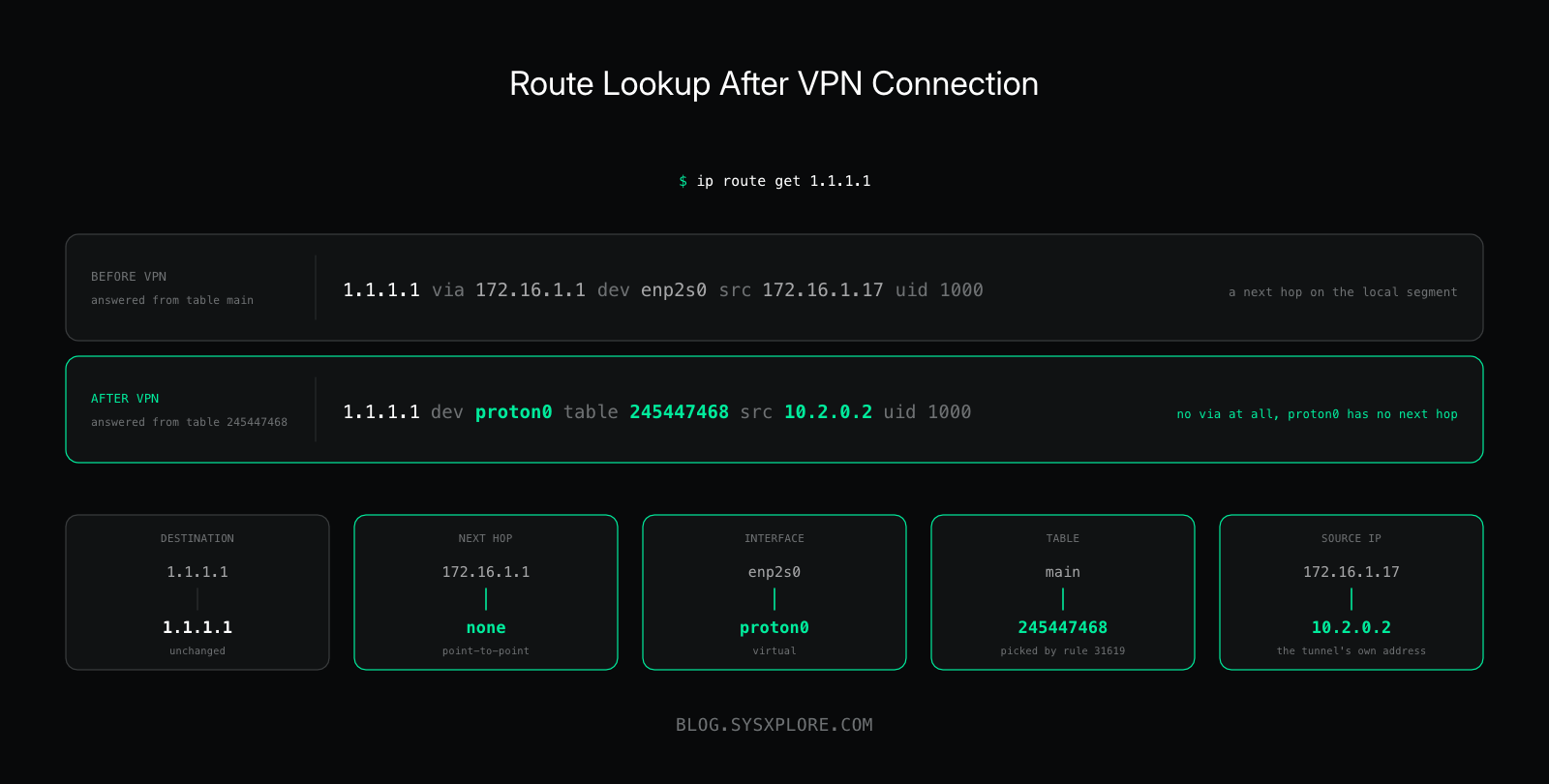
Before connecting to Proton VPN, Linux selected enp2s0, used 172.16.1.17 as the source address and sent the packet toward our physical default gateway at 172.16.1.1.
After connecting, Linux selects proton0 from routing table 245447468 and uses 10.2.0.2 as the source address.
But now we have a problem.
proton0 is not an Ethernet cable or a Wi-Fi adapter. There is no physical network connected to it.
And yet Linux is telling us to reach 1.1.1.1 go through proton0
So what exactly is proton0?
And perhaps more importantly, if Linux sends our packet into this virtual interface, how does that packet eventually leave the computer through the physical enp2s0 interface and travel across the Internet to the Proton VPN server?
That’s what we need to figure out next.
The VPN Interface Is Not a Physical Interface
We now know that after connecting to Proton VPN, Linux routes our traffic toward proton0.
1.1.1.1 dev proton0 table 245447468 src 10.2.0.2But proton0 is very different from the other interfaces on our machine.
Our Ethernet interface, enp2s0, represents actual network hardware. It connects our machine to the local network and ultimately gives us a path to the Internet through our default gateway.
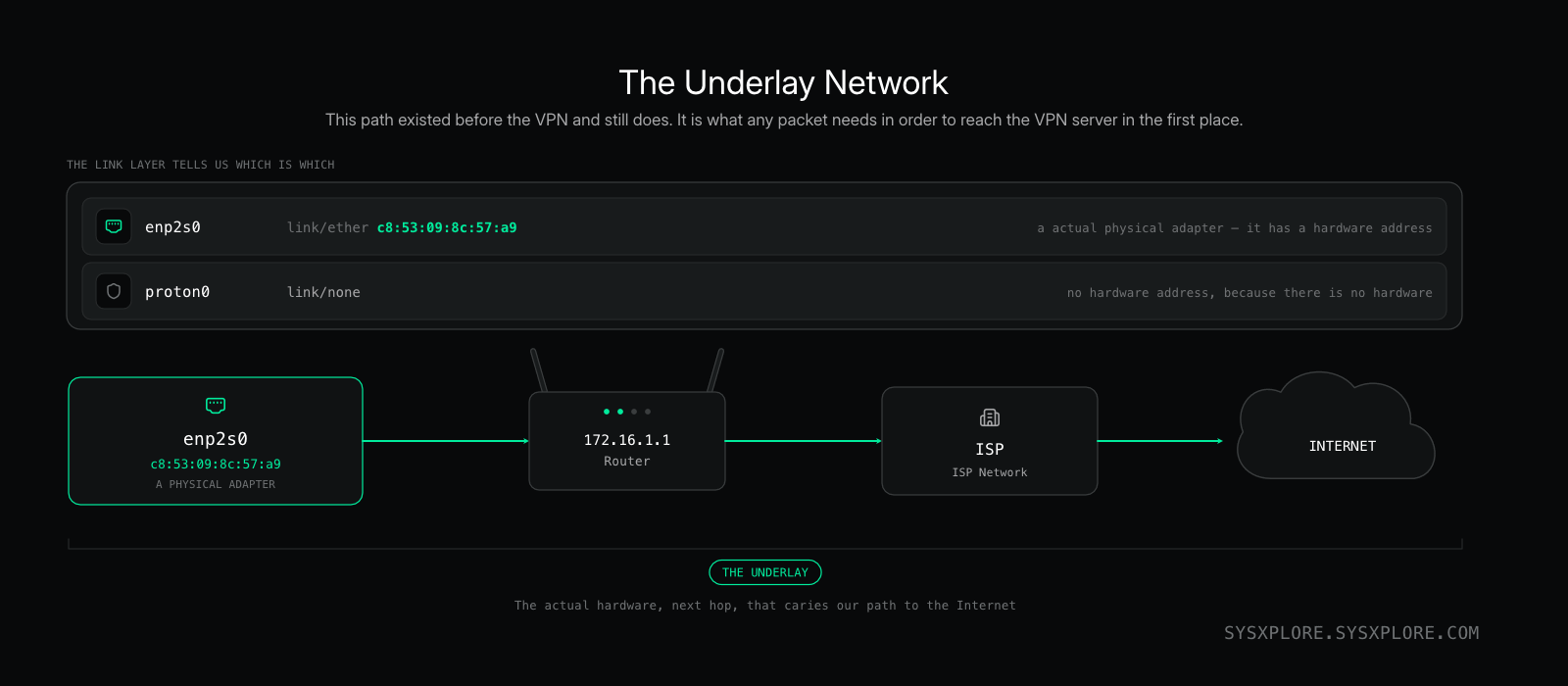
This physical network path already existed before we connected to Proton VPN. In VPN terminology, we can think of this existing network connectivity as the underlay.
The VPN tunnel is built on top of that connectivity.
One clue that proton0 is different was sitting right in our ip addr output:
5: proton0: <POINTOPOINT,NOARP,UP,LOWER_UP> mtu 1420 ...
    link/none
    inet 10.2.0.2/32 scope global noprefixroute proton0
Compare that with our physical Ethernet interface:
enp2s0
    link/ether c8:53:09:8c:57:a9
enp2s0 has an Ethernet MAC address because it represents an Ethernet network interface.
proton0, on the other hand, shows:
link/noneThere is no Ethernet link behind it.
proton0is the virtual WireGuard interface created for our Proton VPN connection.
Unlikeenp2s0, it doesn’t represent a physical network adapter connected to a cable or wireless network. It exists in software and provides the Linux networking stack with an interface through which IP packets can enter the WireGuard tunnel.
You can think of the relationship between the two interfaces as an overlay running on top of an underlay:
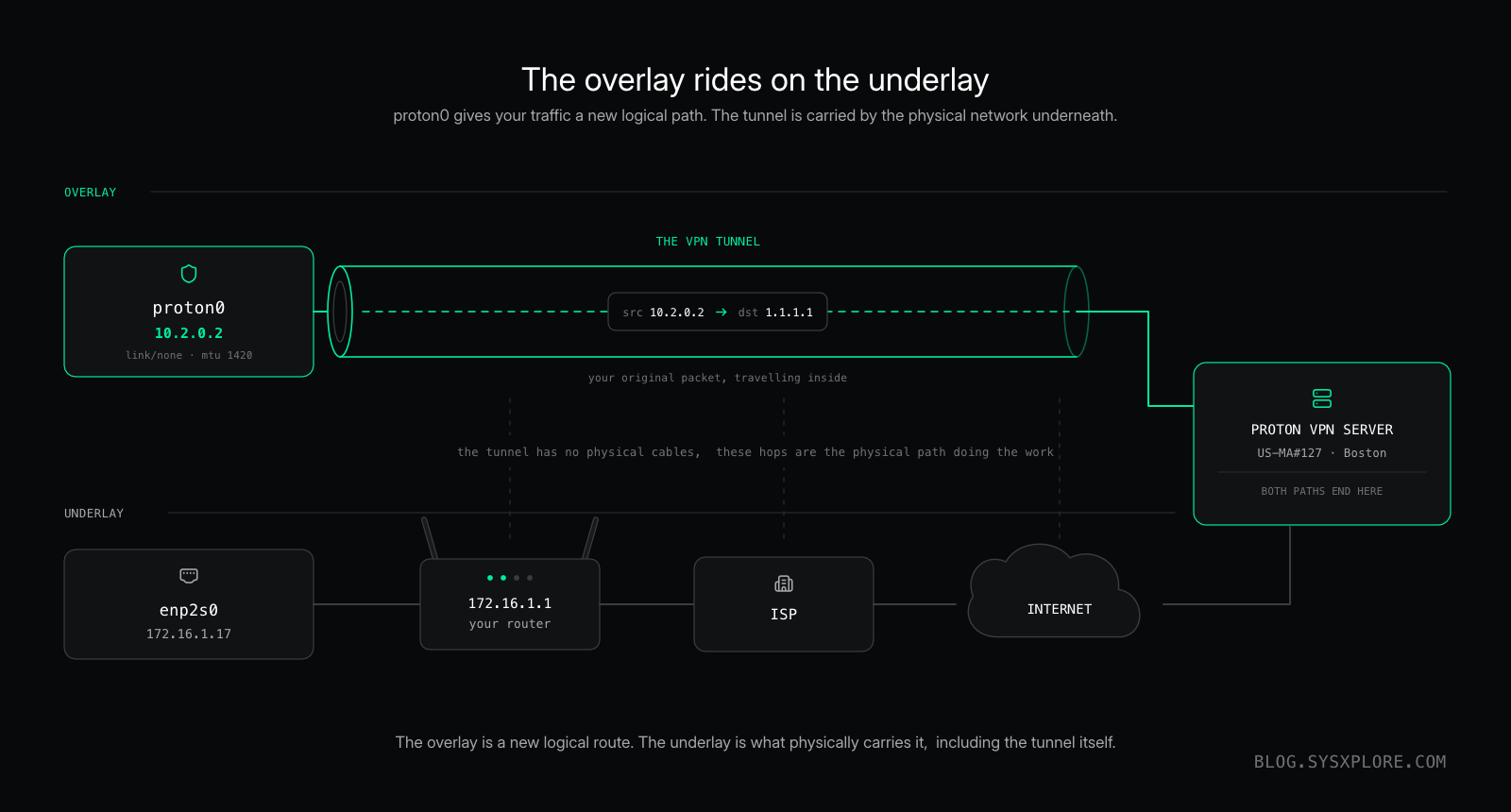
The underlay gives us the network connectivity needed to reach the Proton VPN server.
The overlay gives our IP traffic a new logical path through the VPN.
This distinction is important because when Linux decides to send traffic destined for1.1.1.1throughproton0, the packet does not somehow travel across the Internet through a physicalproton0connection.
The VPN tunnel still depends on the physical network underneath it. Our machine needsenp2s0, our default gateway at172.16.1.1, and our existing Internet connection to communicate with the Proton VPN server.
And this brings us right back to the question we started with.
If Linux routes a packet destined for1.1.1.1intoproton0, but the tunnel itself depends on the physical network to reach the Proton VPN server,how does the packet actually move between those two worlds?
Answering that means going deeper into what happens to the packet itself: encryption, encapsulation, inner and outer IP headers, and how the overlay is carried across the underlay.
That’s where we’ll pick things up in the next article,Life of a Packet Through a VPN.
We’ll follow a single packet as it enters the VPN tunnel and see how the VPN traffic is carried across the physical network underneath it toward the Proton VPN server.
Along the way, we’ll finally unpack the encryption, encapsulation, inner and outer IP headers, and those routing details we deliberately left unexplained earlier.
31618:  from all lookup main suppress_prefixlength 0
31619:  not from all fwmark 0xea13b2c lookup 245447468
For now, the important thing is that connecting to the VPN didn’t replace the physical network underneath our Linux machine.
It added a new logical path on top of it.
Wrapping Up
We started with a simple question:what happens to Linux networking when you connect to a VPN?
As we’ve seen, quite a lot.
What appears to the user as a simpleConnectbutton resulted in a new virtual WireGuard interface, a separate routing table, and new policy-routing rules that changed the path Linux chooses for our Internet traffic.
And we’ve only followed that path as far asproton0.
In the next article, we’ll step inside the tunnel and follow the packet the rest of the way.
Until then, keep exploring and subscribe to get notified when new guides are published.